Blog

Your blog category

Voltage Fluctuations affecting home electrical appliances
Blog

Voltage Fluctuations: Understanding Why Your Home Voltage Isn’t Always Stable

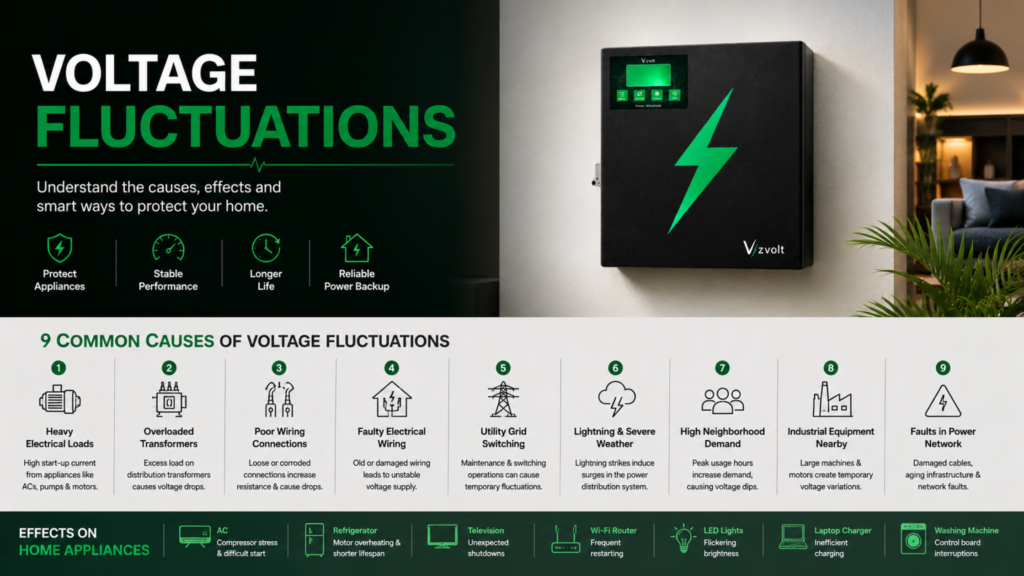
If you’ve ever noticed your lights flickering, your air conditioner suddenly shutting off, or your refrigerator making unusual sounds, there’s a good chance you’ve experienced Voltage Fluctuations. Although most homeowners associate power problems only with blackouts, Voltage Fluctuations are actually far more common. Even when electricity is available, the voltage supplied to your home isn’t always stable. Small variations happen every day, while larger fluctuations can damage sensitive electronics and reduce the lifespan of household appliances. Modern homes depend on televisions, refrigerators, Wi-Fi routers, air conditioners, laptops, and smart home devices. These appliances are designed to operate within a specific voltage range. When the supply repeatedly moves above or below that range, performance, efficiency, and long-term reliability can be affected. Understanding Voltage Fluctuations helps homeowners identify potential risks, protect expensive appliances, and choose the right power backup and protection solutions. In this guide, we’ll explain what Voltage Fluctuations are, why they occur, and the most common reasons behind unstable voltage in residential electrical systems. Understanding Voltage Fluctuations? Voltage Fluctuations refer to the continuous increase or decrease in the electrical voltage supplied to a home or building. In India, the standard household supply is approximately 230V AC. However, due to various electrical conditions, the voltage may temporarily rise above or fall below this value. For example: Small variations are generally acceptable, but significant Voltage Fluctuations can negatively impact electrical equipment. Unlike a complete power outage, electricity is still available during a voltage fluctuation—the quality of the power supply simply changes. Why Stable Voltage Matters Every electrical appliance is designed to operate within a recommended voltage range. When the supplied voltage remains stable: Frequent Voltage Fluctuations, on the other hand, place additional stress on electrical components. Over time, this can lead to: This is why voltage stability is an important consideration in both residential and commercial electrical systems. Types of Voltage Fluctuations Not all voltage variations are the same. Electrical engineers generally classify Voltage Fluctuations into several categories. 1. Over Voltage This occurs when the supply voltage rises above the recommended operating range. Possible effects include: 2. Under Voltage Under voltage occurs when the supplied voltage falls below the required operating level. Common symptoms include: Long periods of under voltage may cause motors to overheat because they compensate by drawing additional current. 3. Short-Term Voltage Dips Sometimes voltage drops for only a fraction of a second. These brief Voltage Fluctuations often occur when heavy electrical loads start operating. Examples include: Sensitive electronics may restart even though the power outage lasts only milliseconds. 4. Voltage Surges Voltage surges are sudden increases in voltage that typically last only a short time. Possible causes include: Even short-duration surges can damage televisions, computers, networking equipment, and inverter electronics. 9 Common Causes of Voltage Fluctuations Understanding the root causes of Voltage Fluctuations helps homeowners take preventive measures. 1. Heavy Electrical Loads Large appliances require significant current during startup. Examples include: When these devices switch on, temporary Voltage Fluctuations may occur because of the sudden increase in demand. 2. Overloaded Distribution Transformers Residential neighborhoods often share electrical transformers. As more homes add: the transformer experiences higher demand. If the load approaches its capacity, nearby homes may experience noticeable Voltage Fluctuations, particularly during summer evenings. 3. Poor Wiring Connections Loose electrical connections create additional resistance. This can result in: Routine electrical inspections help identify these issues before they become serious. 4. Faulty Electrical Wiring Old or damaged wiring may no longer carry electrical current efficiently. Corroded terminals, deteriorated insulation, and undersized cables can contribute to Voltage Fluctuations, especially in older buildings. 5. Utility Grid Switching Power utilities regularly perform maintenance and switch between different feeder lines. Although these operations are carefully managed, brief Voltage Fluctuations may still occur during the transition. 6. Lightning and Severe Weather Thunderstorms are one of the most common natural causes of Voltage Fluctuations. Lightning doesn’t always have to strike a building directly. Nearby strikes can induce temporary voltage surges through electrical distribution lines, affecting homes several kilometers away. 7. High Neighborhood Demand Electricity demand typically peaks during: When many households operate high-power appliances simultaneously, local voltage levels may temporarily decrease. This is one reason why Voltage Fluctuations are often more noticeable during periods of peak electricity consumption. 8. Industrial Equipment Nearby Factories and commercial facilities frequently operate: These heavy electrical loads can create temporary Voltage Fluctuations on nearby distribution networks, particularly if residential and industrial consumers share the same feeder. 9. Faults in the Power Distribution Network Electrical faults such as damaged cables, aging infrastructure, or malfunctioning transformers can also contribute to unstable voltage. Utilities continuously monitor and maintain distribution systems, but localized faults may still lead to temporary Voltage Fluctuations until repairs are completed. How Voltage Fluctuations Affect Home Appliances Not every appliance reacts the same way to unstable voltage. For example: Appliance Effect of Voltage Fluctuations Air Conditioner Compressor stress, difficult startup Refrigerator Motor overheating, reduced lifespan Television Unexpected shutdowns Wi-Fi Router Frequent restarting LED Lights Flickering brightness Laptop Charger Inefficient charging Washing Machine Control board interruptions Over time, repeated Voltage Fluctuations can increase wear on motors, power supplies, and electronic control circuits. Rather than causing immediate failure, unstable voltage often shortens appliance life gradually—making prevention an important part of protecting modern home electronics. Warning Signs of Voltage Fluctuations Many homeowners don’t realize they have Voltage Fluctuations until an appliance stops working. Fortunately, there are several warning signs that can help you identify the problem early. Common indicators include: If these symptoms occur regularly, it’s worth having your electrical system inspected before they lead to equipment damage. How to Protect Your Home from Voltage Fluctuations While you can’t always control the quality of electricity supplied by the utility, there are several ways to reduce the impact of Voltage Fluctuations. 1. Install Proper Voltage Protection Sensitive electronics such as televisions, computers, networking equipment, and home automation systems benefit from dedicated voltage protection devices that help reduce the impact of sudden voltage changes. 2. Use Quality Electrical Wiring Proper cable sizing and secure

1.28 kWh Meaning
Blog

1.28 kWh Meaning: Understanding What It Really Means

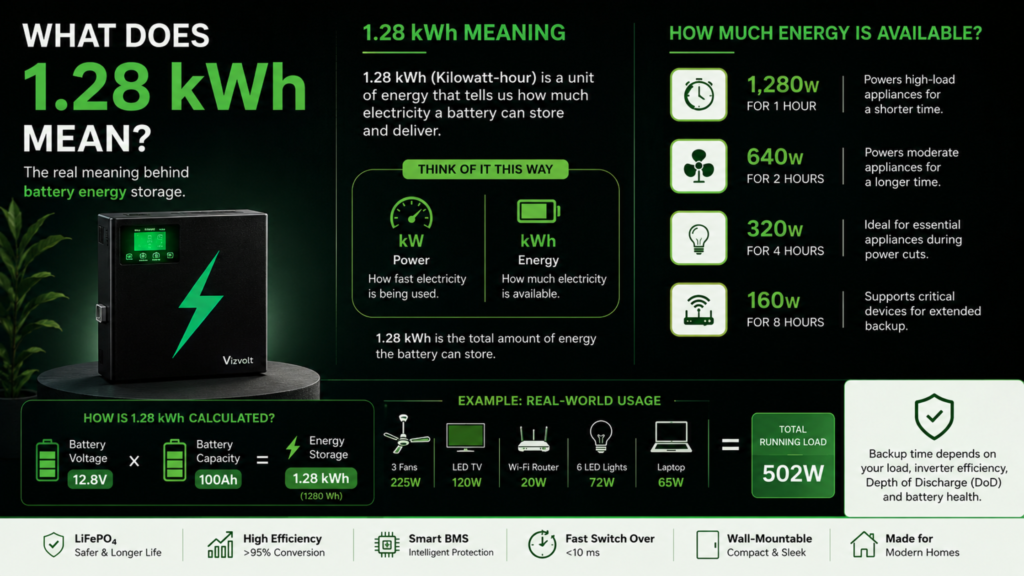
If you’ve ever compared lithium inverters or home battery systems, you’ve probably come across a specification like “1.28 kWh Battery Capacity.” At first glance, it sounds technical, and many buyers simply skip over it. But in reality, 1.28 kWh Meaning is one of the most important specifications you should understand before choosing a power backup solution. Why? Because this single number determines how much energy your battery can actually store, how long your appliances can run during a power outage, and whether an inverter is suitable for your daily needs. Many people mistakenly assume that a higher VA rating automatically means longer backup. Others compare batteries only by their Ah (Ampere-hour) rating. However, neither tells the complete story. The 1.28 kWh Meaning gives a much clearer picture of the battery’s actual energy storage capability. In this guide, we’ll explain 1.28 kWh Meaning in simple language, explore how it is calculated, and understand why electrical engineers prefer using kilowatt-hours instead of just battery voltage or Ah ratings. What Does 1.28 kWh Mean? Let’s begin with the basics. The 1.28 kWh Meaning is the total amount of electrical energy that a battery can store. Here,kW (Kilowatt) represents power.kWh (Kilowatt-hour) represents energy. Think of it this way: Power tells you how fast electricity is being used. Energy tells you how much electricity is available. A battery with 1.28 kWh energy storage can theoretically deliver: In simple words, the 1.28 kWh Meaning refers to the battery’s total stored energy—not its output power. This distinction is extremely important when comparing inverters. Why is kWh Important? When homeowners ask, “How long will my inverter last during a power cut?” the answer depends far more on kWh than on the inverter’s VA rating. That’s because the battery stores energy, not power. Imagine two batteries: Battery A1.28 kWh Battery B2.56 kWh Even if both are connected to the same inverter, Battery B stores twice as much energy, meaning it can generally provide backup for nearly twice as long under the same load. This is exactly why understanding the 1.28 kWh Meaning helps buyers compare batteries more accurately. Difference Between kW and kWh One of the most common misconceptions is confusing kW with kWh. Although they look similar, they measure completely different things. kW kWh Measures Power Measures Energy Indicates how much power is delivered Indicates how much energy is stored Used to describe inverter output Used to describe battery capacity Similar to the speed of a car Similar to the amount of fuel in the tank Here’s an easy analogy. Imagine you’re driving a car. A faster car doesn’t necessarily travel farther. Similarly, a higher power inverter doesn’t automatically provide longer backup. The 1.28 kWh Meaning is directly related to how much usable energy is available inside the battery. How is 1.28 kWh Calculated? The calculation is actually quite simple. Electrical engineers calculate battery energy using the following formula: Battery Energy (Wh) = Battery Voltage × Battery Capacity (Ah) Let’s consider a typical lithium battery. Battery Voltage = 12.8 VBattery Capacity = 100 Ah Calculation: 12.8 × 100 = 1280 WhSince,1000 Wh = 1 kWh Therefore, 1280 Wh = 1.28 kWh This is the origin of the specification you often see in lithium battery datasheets. Understanding this formula makes the 1.28 kWh Meaning much easier to interpret when comparing different battery technologies. Why Lithium Batteries Commonly Use 1.28 kWh Many modern LiFePO₄ (Lithium Iron Phosphate) batteries are designed with a nominal voltage of 12.8V and a capacity of 100Ah. When these values are multiplied, they naturally result in 1.28 kWh of stored energy. This configuration has become a popular choice for residential power backup because it offers a practical balance between storage capacity, efficiency, and compact size. However, it’s important to remember that the 1.28 kWh Meaning refers to the battery’s total stored energy. The actual usable energy depends on factors such as Depth of Discharge (DoD), inverter efficiency, operating temperature, and the Battery Management System (BMS). Real-Life Example Imagine your home is running the following appliances during a power outage: Total Running Load = 502 W A battery with 1.28 kWh of stored energy will generally provide backup based on this running load, though the exact duration depends on usable battery capacity and system efficiency. This example highlights why understanding the 1.28 kWh Meaning is far more useful than looking only at the inverter’s VA rating. It gives homeowners a clearer idea of the energy available to power essential appliances during an outage. How Long Does a 1.28 kWh Battery Last? One of the most common questions homeowners ask is: “If my battery is rated at 1.28 kWh, how many hours of backup will I actually get?” The answer depends on how much power your appliances consume. A battery doesn’t discharge at a fixed rate. Instead, backup time changes according to the connected electrical load. The 1.28 kWh Meaning becomes much more practical when you compare it with your home’s Running Load. Estimated Backup Time Running Load Approximate Backup Time* 100 W 10–11 Hours 200 W 5–5.5 Hours 300 W 3–3.5 Hours 500 W 2–2.5 Hours 800 W 1.2–1.5 Hours 1000 W Around 1 Hour *Approximate values. Actual backup depends on inverter efficiency, battery health, Depth of Discharge (DoD), ambient temperature, and appliance startup current. This example helps homeowners understand the 1.28 kWh Meaning in real-world conditions rather than as just another specification on a product sheet. Factors That Affect Backup Time Even if two batteries have the same capacity, they may not deliver the same runtime. Here are the major factors: 1. Running Load The more appliances you use, the faster the battery discharges. Running only essential appliances significantly increases backup time. 2. Inverter Efficiency No inverter converts stored DC energy into AC power with 100% efficiency. Modern lithium inverter systems often achieve efficiencies above 95%, helping maximize usable energy. 3. Depth of Discharge (DoD) A battery’s total energy isn’t always fully usable. For example: This is another reason why understanding the 1.28 kWh Meaning

Connected Load vs Running Load
Blog

Connected Load vs Running Load: Why Understanding the Difference Can Save You Money

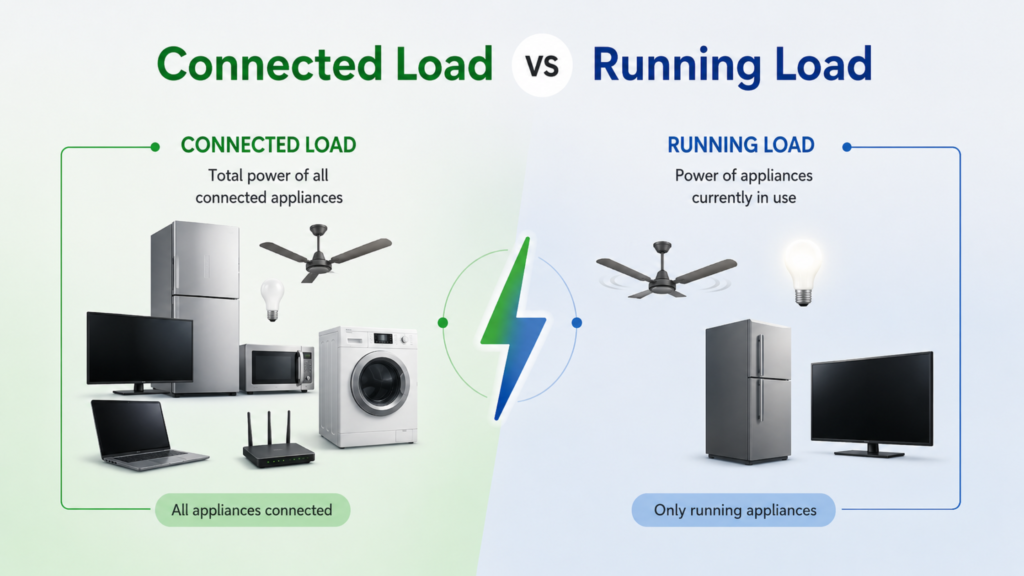
Understanding Connected Load vs Running Load helps homeowners avoid selecting an oversized or undersized inverter. Instead of relying only on appliance wattage, comparing Connected Load vs Running Load provides a more accurate picture of your home’s actual power requirements. Imagine you’re buying a new inverter for your home. You calculate the wattage of every appliance-fans, lights, television, refrigerator, Wi-Fi router, and even your laptop charger. The total comes to around 2,000 watts, so you assume you need an inverter that can continuously supply 2,000 watts. But is that really how electrical loads work? Not always. One of the biggest misconceptions homeowners make is confusing Connected Load vs Running Load. Although the two terms sound similar, they represent different aspects of electrical power consumption, and understanding the difference can help you choose the right inverter, avoid unnecessary expenses, and ensure reliable backup during power outages. In this guide, we’ll explain Connected Load vs Running Load in simple terms, discuss why they matter, and show how electrical engineers use these values while designing modern power backup systems. What is Connected Load? Connected Load is the total rated power of all electrical appliances connected to your electrical system, regardless of whether they are operating at the same time. Think of it as the maximum possible electrical demand if every connected appliance were switched ON simultaneously. For example, imagine your home has the following appliances: Appliance Rated Power LED TV 120 W Refrigerator 250 W Ceiling Fans (3) 225 W LED Lights (10) 120 W Wi-Fi Router 20 W Laptop 65 W Washing Machine 500 W Microwave Oven 1200 W If you add all these ratings together: Connected Load = 2,500 W This doesn’t necessarily mean your home continuously consumes 2,500 watts. It simply represents the total installed electrical load. Why is Connected Load Important? Knowing your Connected Load helps engineers and electricians design safe electrical systems. It is commonly used for: In simple words, Connected Load tells us what could happen if every connected appliance operates together. However, in everyday life, this rarely happens. Most households don’t use every appliance at the same time. That’s where Running Load becomes much more practical. What is Running Load? Running Load refers to the actual electrical power being consumed by appliances that are operating at a given moment. Unlike Connected Load, Running Load changes throughout the day. For example: Morning: Running Load ≈ 450 W Evening: Running Load ≈ 900 W Night: Running Load ≈ 400 W As you can see, Running Load depends entirely on which appliances are currently in use. This is the value that matters most when selecting a residential inverter because the inverter only supplies power to appliances that are actually running. Connected Load vs Running Load Although these terms are often used interchangeably, they describe different electrical concepts. Feature Connected Load Running Load Definition Total rated power of all connected appliances Actual power consumed by operating appliances Changes Throughout the Day No Yes Used for Electrical Design Yes Yes Used for Inverter Sizing Partially Mostly Represents Maximum Installed Load Yes No Represents Actual Consumption No Yes A simple way to remember this is: Understanding Connected Load vs Running Load makes it much easier to estimate your home’s real power requirements. Why Does the Difference Matter? Choosing an inverter based only on Connected Load can lead to unnecessary oversizing. Imagine a home with a Connected Load of 3 kW.In reality, the family may only operate around 1.2–1.5 kW of appliances during a power outage. Buying a 3 kW inverter simply because the Connected Load is 3 kW could result in: On the other hand, ignoring Connected Load completely isn’t advisable either. If additional appliances are expected to run in the future, selecting an inverter with some spare capacity provides greater flexibility. This is why professional system designers evaluate both Connected Load vs Running Load before recommending a power backup solution. Real Home Example Let’s consider a typical Indian household. Connected Appliances Connected Load 2,627 WNow imagine there’s a power cut. The homeowner decides to use only: The Running Load becomes approximately: 762 W This example clearly shows why Connected Load vs Running Load should never be confused. Although the home’s installed load exceeds 2.6 kW, the inverter only needs to support the appliances that are intended to operate during a blackout. Modern backup solutions, including the Vizvolt Smart Lithium Inverter, are typically selected by considering real-world Running Load, future expansion, appliance startup requirements, and battery backup expectations rather than simply adding the wattage of every connected appliance. Starting Load vs Running Load: Another Important Difference While discussing Connected Load vs Running Load, there’s another term you should know-Starting Load. Certain appliances, especially those with electric motors, require a higher amount of power for a few seconds when they start. This temporary surge is called Starting Load or Starting Current. For example: Appliance Running Load Starting Load Refrigerator 250 W 700–1000 W Water Pump 750 W 1800–2500 W Air Conditioner 1200 W 2500–3500 W Washing Machine 500 W 900–1200 W Although the Running Load is much lower, the inverter must be capable of handling this short surge without shutting down. This is why engineers evaluate Connected Load vs Running Load along with Starting Load before selecting an inverter. How to Calculate Running Load Before purchasing an inverter, always calculate Connected Load vs Running Load separately. This simple comparison helps estimate actual power consumption and improves inverter selection accuracy. Calculating Running Load is easier than many people think. Step 1: List the appliances you want during a power cut. For example: Step 2: Add their power ratings. Running Load = 48 + 225 + 250 + 20 + 120 + 65 = 728 W Step 3: Add a safety margin. Electrical engineers generally recommend keeping 20–30% spare capacity for future expansion and surge handling. 728 W × 1.25≈ 910 W This approach ensures the inverter operates efficiently without constantly running at its maximum capacity. Common Mistakes While Choosing an Inverter Many homeowners purchase

Battery C Rating
Blog

Battery C Rating Explained: Why Fast Charging Isn’t Just About Speed

When buying a lithium inverter, most people compare battery capacity, backup time, charging speed, or warranty. While these specifications are important, there’s another technical parameter that plays a major role in battery performance-Battery C Rating. The Battery C Rating determines how quickly a battery can be safely charged or discharged. It affects charging time, heat generation, efficiency, battery lifespan, and overall reliability. Many people assume that faster charging is always better. However, from an engineering perspective, charging speed must always be balanced with battery chemistry and thermal management. A battery that charges extremely fast without proper control can generate excess heat and experience faster degradation. In this guide, we’ll explain what Battery C Rating means, how 0.2C, 0.5C, and 1C charging rates differ, and why understanding this specification helps you choose a smarter lithium inverter. What is Battery C Rating? The Battery C Rating indicates how quickly a battery can be charged or discharged relative to its total capacity. Instead of measuring charging speed in hours, engineers use C-Rating because it provides a universal way to describe battery performance regardless of battery size. Think of it as the battery’s “speed limit.” A higher Battery C Rating means the battery can safely accept or deliver more current in less time. For example: This specification is widely used in lithium batteries because it helps balance charging speed, efficiency, and battery life. How is Battery C Rating Calculated? The calculation is straightforward. Charging Current = Battery Capacity × C Rating Let’s take a 100 Ah lithium battery as an example. At 0.2C Charging Current100 Ah × 0.2 = 20 Amps At 0.5C Charging Current100 Ah × 0.5 = 50 Amps At 1C Charging Current100 Ah × 1 = 100 Amps As the Battery C Rating increases, the battery charges faster because more current is supplied. However, higher charging currents also increase electrical and thermal stress, which is why proper battery management becomes essential. Understanding 0.2C, 0.5C, and 1C Not every battery is designed to charge at the same speed. Let’s understand what these ratings mean in real-world applications. 0.2C Battery C Rating A 0.2C Battery C Rating means the battery is charged using current equal to 20% of its capacity. For a 100 Ah battery, that equals 20 A. Advantages Limitations Lead-acid batteries are commonly charged at lower C-rates because they are more sensitive to high charging currents. 0.5C Battery C Rating A 0.5C Battery C Rating is often considered a balanced charging rate. For a 100 Ah battery, charging current becomes 50 A. This offers a good compromise between charging speed and battery longevity. Advantages Many residential lithium energy storage systems operate efficiently around this charging range. 1C Battery C Rating A 1C Battery C Rating means the battery is charged using current equal to its full capacity. For a 100 Ah battery, the charging current is 100 A. In theory, this allows the battery to charge in approximately one hour. While this significantly reduces charging time, it also requires advanced thermal management, high-quality battery cells, and an intelligent Battery Management System (BMS). Not every battery is designed to safely operate at a 1C charging rate. Why Does Battery C Rating Matter? At first glance, Battery C Rating might seem like a specification meant only for engineers. In reality, it has a direct impact on everyday performance. A properly selected Battery C Rating influences: This is why manufacturers don’t simply aim for the fastest possible charging speed. Instead, they select a charging rate that provides the best balance between performance and long-term durability. Does a Higher Battery C Rating Always Mean Better Performance? Not necessarily. A higher Battery C Rating reduces charging time, but it also increases electrical current flowing through the battery. Higher current means: Modern lithium batteries are designed to handle these conditions far better than traditional battery technologies, but charging speed should always remain within the manufacturer’s recommended limits. This is why premium lithium backup systems focus not only on charging quickly but also on charging intelligently. For example, modern lithium inverters such as the Vizvolt Smart Lithium Inverter use an intelligent Battery Management System (BMS) to regulate charging current, monitor battery temperature, and optimize charging performance. Instead of simply charging as fast as possible, the system balances speed with battery health, helping extend service life while maintaining safe operation. Battery C Rating and Heat Generation One of the biggest misconceptions about fast charging is that it’s only about reducing charging time. In reality, every increase in charging current also increases heat generation inside the battery. Whenever electricity flows through a battery, a small amount of energy is naturally lost as heat due to the battery’s internal resistance. The higher the charging current (higher C-rating), the greater the heat produced. For example: If excessive heat isn’t properly managed, it can lead to: This is why premium lithium battery systems are engineered with intelligent Battery Management Systems (BMS) that continuously monitor battery temperature and automatically adjust charging current whenever necessary. Fast charging should never come at the cost of battery health. Battery C Rating and Lithium Chemistry Not all lithium batteries behave the same way. The battery’s chemistry plays a major role in determining how much charging current it can safely handle. Different lithium chemistries have different characteristics in terms of: Among them, Lithium Iron Phosphate (LiFePO₄) has become one of the most preferred chemistries for home energy storage. Why? Because LiFePO₄ batteries offer: These characteristics allow lithium inverters to support efficient charging while maintaining long-term battery reliability. Why Fast Charging Isn’t Just About Speed People often ask, “If a battery can charge faster, why not always use the highest charging rate?” The answer is simple: Charging speed is only one part of the equation. Engineers also consider: A well-designed lithium inverter doesn’t simply charge as quickly as possible-it charges intelligently. As the battery approaches full capacity, the charging current is gradually reduced to prevent overcharging and minimize stress on the cells. This charging strategy helps improve battery efficiency

Battery Management System
Blog

Battery Management System: The Brain Behind Every Lithium Inverter

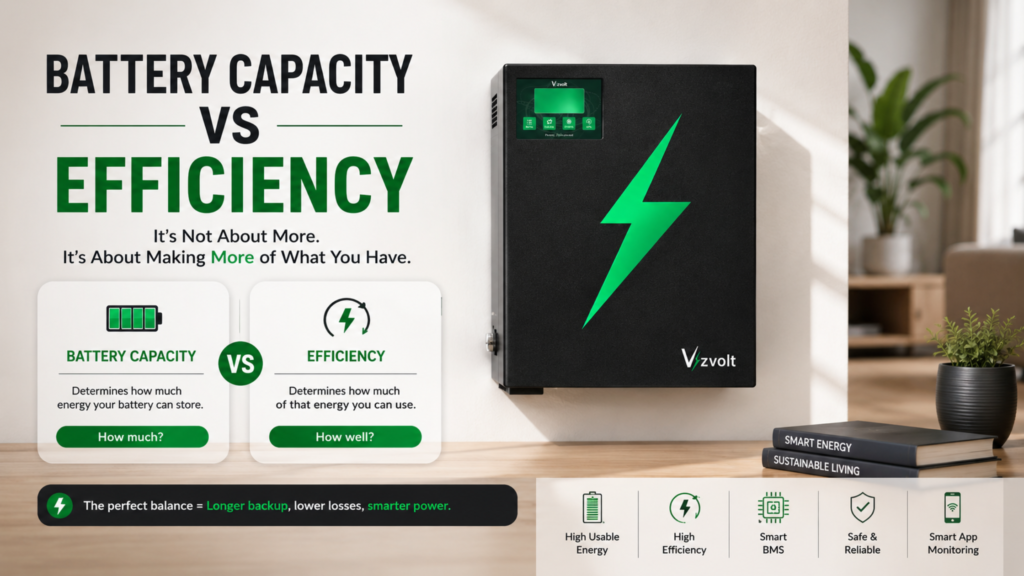
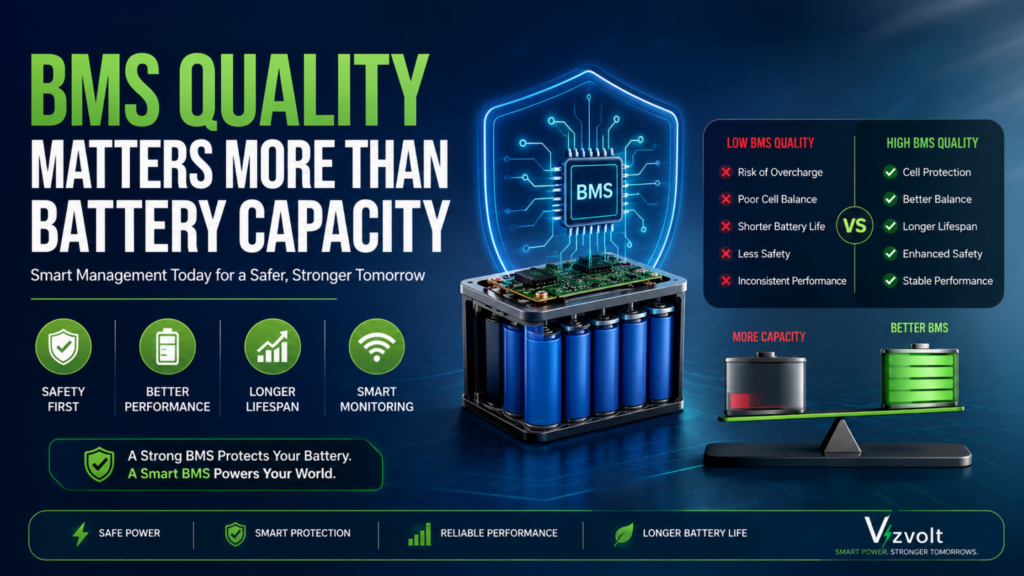
Buying a lithium inverter isn’t just about battery capacity, backup time, or charging speed. Behind every reliable lithium battery is an intelligent controller working silently in the background-the Battery Management System. Think of it as the brain of the battery. A Battery Management System (BMS) continuously monitors every battery cell, controls charging and discharging, protects against unsafe operating conditions, and ensures the battery performs efficiently throughout its lifespan. Without a BMS, even the most advanced lithium battery would be vulnerable to overheating, overcharging, deep discharge, and premature failure. Whether you’re a homeowner looking for a reliable power backup solution or someone interested in how modern lithium inverters work, understanding the Battery Management System will help you appreciate why it’s one of the most important components inside every lithium inverter. What is a Battery Management System? A Battery Management System (BMS) is an electronic control unit that manages, monitors, and protects rechargeable battery packs. Instead of simply charging a battery, the BMS constantly checks its health, measures operating conditions, and makes real-time decisions to ensure safe and efficient operation. You can think of it as the battery’s onboard computer. It monitors parameters such as: Based on this information, the Battery Management System decides whether charging should continue, whether power should be supplied, or whether the battery needs protection from unsafe conditions. Why Every Lithium Inverter Needs a Battery Management System Lithium batteries are far more energy-dense than traditional lead-acid batteries. While this makes them compact, efficient, and long-lasting, it also means they require intelligent monitoring. Unlike lead-acid batteries, lithium cells operate within a much narrower voltage range. Even a small deviation can affect performance or reduce battery life if left unmanaged. This is where the Battery Management System becomes essential. It continuously monitors battery conditions and reacts within milliseconds to maintain safe operation. Modern lithium inverter systems, including the Vizvolt Smart Lithium Inverter, rely on an intelligent Battery Management System to optimize charging, improve battery efficiency, and protect the battery pack during everyday operation. Rather than waiting for a fault to occur, the BMS works proactively to maintain battery health throughout thousands of charging cycles. How Does a Battery Management System Work? A Battery Management System is constantly collecting data from the battery pack. The process typically looks like this: Every second, the BMS measures electrical parameters from multiple battery cells. It compares these readings against predefined safety limits. If everything is operating normally, the battery continues supplying power. If abnormal conditions are detected-such as excessive temperature, high current, or abnormal cell voltage-the BMS immediately takes protective action. This real-time monitoring is one of the biggest reasons modern lithium batteries are both reliable and safe. Cell Balancing: Keeping Every Battery Cell Equal A lithium battery pack isn’t made up of one large cell. Instead, it’s built using multiple smaller cells connected together. Over time, these individual cells naturally develop slight differences in voltage. For example: Cell 1 → 3.65 VCell 2 → 3.61 VCell 3 → 3.64 VCell 4 → 3.58 V While these differences may seem small, they can gradually affect battery performance if left unchecked. This is where cell balancing comes in. The Battery Management System continuously monitors every individual cell and ensures they remain as closely matched as possible. Balanced cells offer several advantages: Without proper balancing, the weakest cell determines the overall performance of the entire battery pack. This is why cell balancing is considered one of the most important functions of a modern Battery Management System. Temperature Monitoring: Protecting the Battery from Heat Temperature is one of the biggest factors affecting lithium battery performance. Every battery performs best within a specific operating temperature range. If temperatures become too high, battery degradation accelerates. If temperatures become too low, charging efficiency decreases. To prevent these issues, the Battery Management System continuously monitors battery temperature using multiple sensors placed throughout the battery pack. When abnormal temperatures are detected, the BMS can: This intelligent temperature monitoring not only improves safety but also helps maximize battery lifespan. For homeowners, it means more consistent performance during different seasons and operating conditions. In smart lithium backup systems such as the VizVolt Smart Lithium Inverter, intelligent thermal monitoring works alongside other protection features to ensure the battery operates safely while delivering reliable backup power. Over-Current Protection: Preventing Electrical Damage Every electrical system has a maximum current it can safely handle. If an appliance suddenly draws excessive current due to a short circuit, overload, or faulty wiring, the battery can experience excessive stress. Left unchecked, this can damage battery cells, electronic components, and connected appliances. This is where the Battery Management System acts as a real-time safety controller. The BMS continuously measures the charging and discharging current flowing through the battery pack. If the current exceeds the safe operating limit, it immediately responds by: This happens within milliseconds, long before the user notices a problem. For modern home backup systems, this level of protection is especially important because multiple appliances often start simultaneously after a power outage. MOSFET Control: The Electronic Switch Inside the BMS One of the most important components inside a Battery Management System is the MOSFET (Metal-Oxide-Semiconductor Field-Effect Transistor). Think of a MOSFET as an intelligent electronic switch. Instead of mechanical relays opening and closing, MOSFETs control the flow of electricity electronically, making them faster, quieter, and far more efficient. The BMS uses MOSFETs to: Because MOSFETs switch extremely quickly, they allow the Battery Management System to react almost instantly when abnormal conditions occur. This rapid response helps improve battery safety while reducing unnecessary power losses. CAN Communication: Helping Devices Talk to Each Other Modern lithium batteries are no longer standalone devices. Today’s smart energy systems rely on continuous communication between different electronic components. This is where CAN (Controller Area Network) Communication becomes important. CAN communication allows the Battery Management System to exchange information with: Instead of operating independently, every component works together. For example, the BMS can send information such as: This communication enables smarter charging, improved diagnostics, and real-time

Depth of Discharge
Blog

Depth of Discharge: 7 Powerful Facts Every Lithium Inverter Buyer Should Know

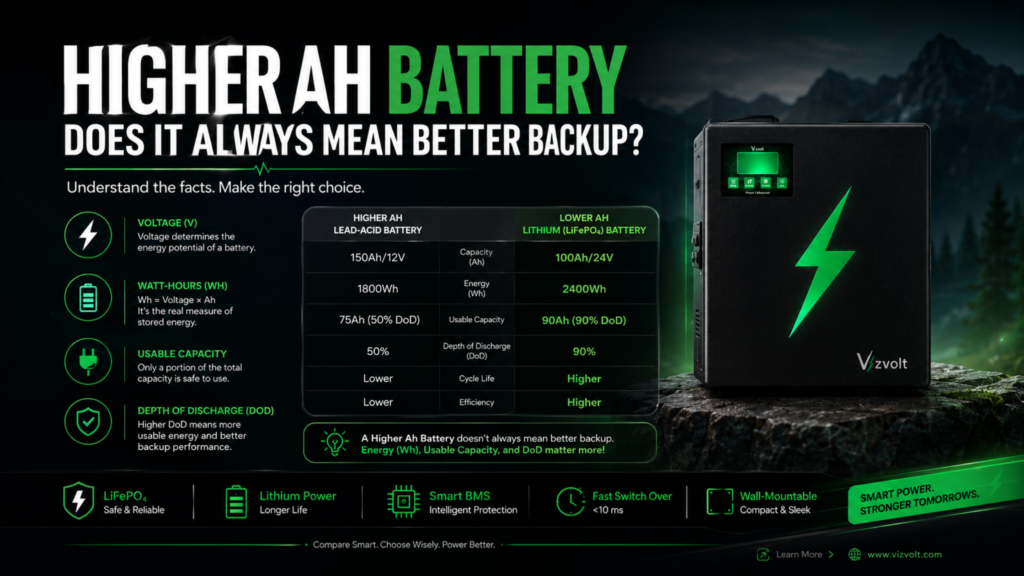
When buying a lithium inverter, most people compare battery capacity, backup time, warranty, and price. While these factors are important, one technical specification often goes unnoticed-Depth of Discharge. In reality, Depth of Discharge plays a major role in determining how much usable energy your battery can deliver and how efficiently it performs over its lifetime. Two batteries with the same capacity can provide completely different backup experiences simply because they have different DoD ratings. Whether you’re purchasing a backup power system for your home, office, or small business, understanding Depth of Discharge will help you make a smarter investment. Modern lithium inverter systems, such as the Vizvolt Smart Lithium Inverter, are designed to maximize usable battery capacity while protecting battery health through intelligent battery management. In this guide, we’ll explain what Depth of Discharge means, why it matters, and how it can help you choose the right lithium inverter for long-term reliability. What is Depth of Discharge? Depth of Discharge (DoD) refers to the percentage of a battery’s total stored energy that has been used before it is recharged. In simple words, it tells you how much of your battery’s capacity has been consumed. For example: Suppose your battery has a total capacity of 100 Ah. If you use 80 Ah, then: DoD = 80% This means: Think of your battery like a water tank. The size of the tank represents battery capacity, while Depth of Discharge tells you how much water has already been used. The higher the safe DoD, the more usable energy you can access before recharging the battery. Why is Depth of Discharge Important? Many buyers assume that battery capacity alone determines backup time. That’s not entirely true. Imagine these two batteries: Battery A Usable Energy:50 Ah Battery B Usable Energy:90 Ah Although both batteries are rated at 100 Ah, Battery B delivers almost twice the usable backup. This is why Depth of Discharge is one of the most important specifications when comparing lithium inverters. It directly affects: How Does Depth of Discharge Work? Every rechargeable battery stores electrical energy. When you turn on appliances like: the battery gradually releases stored energy. The more energy that leaves the battery, the higher the Depth of Discharge becomes. For example: Battery Remaining Depth of Discharge 100% 0% 80% 20% 60% 40% 40% 60% 20% 80% 0% 100% As the battery discharges, the DoD increases. After charging, the cycle begins again. Depth of Discharge vs State of Charge (SoC) These two terms often confuse first-time buyers. Although they sound similar, they describe opposite conditions. Depth of Discharge State of Charge Amount of energy used Amount of energy remaining Increases during usage Decreases during usage Measures battery utilization Measures available charge Example: Battery remaining: 30%State of Charge: 30%Depth of Discharge: 70% Simply remember: Depth of Discharge + State of Charge = 100% Understanding this relationship helps users monitor battery performance more accurately. Common Depth of Discharge Levels Not every battery is designed to operate at the same Depth of Discharge. Let’s understand the most common levels. 50% Depth of Discharge Traditional lead-acid batteries generally perform best when only half of their stored energy is used. Advantages: Limitations: 80% Depth of Discharge Many modern lithium batteries are designed to safely support around 80% Depth of Discharge. Benefits include: This level is ideal for homes, offices, and small commercial spaces. 90-100% Depth of Discharge Premium lithium batteries equipped with advanced Battery Management Systems (BMS) can safely operate at even higher Depth of Discharge levels. Advantages include: However, achieving high DoD safely depends on battery quality, thermal management, and intelligent battery protection. Why Lithium Batteries Handle Higher Depth of Discharge One of the biggest reasons homeowners are switching to lithium inverters is their ability to safely operate at higher Depth of Discharge levels. Unlike conventional lead-acid batteries, lithium batteries-especially LiFePO₄ (Lithium Iron Phosphate) batteries—are designed for frequent charge and discharge cycles. They offer several important advantages: More Usable Energy Lithium batteries allow users to access a larger percentage of stored energy without significantly affecting performance. Faster Charging Modern lithium batteries recharge much faster, reducing downtime during frequent power cuts. Stable Voltage Lithium batteries maintain consistent voltage throughout the discharge cycle, helping sensitive electronics perform reliably. Longer Lifespan Because of their advanced chemistry, lithium batteries generally deliver thousands of charge-discharge cycles under normal operating conditions. These characteristics make lithium technology a preferred choice for modern residential and commercial power backup systems. How Vizvolt Smart Lithium Inverter Uses Depth of Discharge Efficiently A battery is only as good as the system managing it. The Vizvolt Smart Lithium Inverter combines advanced lithium battery technology with an intelligent Battery Management System (BMS) to ensure efficient energy usage while protecting battery health. Some of its key advantages include: By intelligently managing charging and discharging, VizVolt helps homeowners maximize usable battery capacity while maintaining long-term reliability. How Depth of Discharge Affects Battery Life One of the biggest concerns buyers have is whether using more of a battery reduces its lifespan. The answer is yes—but it depends on the battery technology. Every rechargeable battery has a limited number of charge-discharge cycles, commonly known as cycle life. A cycle is completed when a battery is discharged and then fully recharged. The number of cycles a battery can provide depends on several factors, including: Generally, repeatedly discharging a battery to very low levels places more stress on it. However, modern LiFePO₄ (Lithium Iron Phosphate) batteries are specifically designed to handle deep discharge much better than traditional lead-acid batteries. Typical Relationship Between DoD and Battery Cycle Life Depth of Discharge Battery Performance 50% DoD Long cycle life with lower usable energy 80% DoD Excellent balance between backup and battery life 90% DoD High usable capacity with very good longevity 100% DoD Depends on battery quality and Battery Management System Although higher Depth of Discharge increases battery utilization, a high-quality lithium battery can still deliver thousands of charging cycles while maintaining excellent performance. What is Deep Discharge? Deep discharge refers to draining a

what happens if you overload an inverter?
Blog

What Happens If You Overload an Inverter?

Imagine this. It’s a hot summer evening. Suddenly, the electricity goes out. You switch your home’s power backup on and, without thinking twice, turn on the television, refrigerator, Wi-Fi router, ceiling fans, lights, microwave, and maybe even the air conditioner. A few seconds later…Your inverter starts beeping.The overload indicator lights up.Everything shuts down. If this situation sounds familiar, you’re not alone. Many homeowners unknowingly overload their inverter, assuming it can power every appliance in the house. While modern inverters are designed with safety features, repeatedly exceeding their capacity can reduce performance, shorten battery life, and even damage connected appliances. So, what happens if you overload an inverter? In this guide, we’ll explain everything you need to know, from the warning signs and risks to practical ways to avoid overload and keep your home’s power backup running efficiently. What Does It Mean to Overload an Inverter? Understanding What Happens If You Overload an Inverter helps you avoid unnecessary repairs, battery damage, and reduced backup performance. An inverter is designed to supply power only up to its rated capacity. For example, the Vizvolt 1.1 kVA Pure Sine Wave Smart Inverter delivers approximately 1.0–1.2 kW of usable power. If the total power consumed by connected appliances exceeds this limit, the inverter enters an overload condition. Simply put, Overloading happens when your appliances demand more electricity than your inverter is designed to deliver. Think of it like carrying groceries. If one bag comfortably holds 10 kilograms, trying to carry 20 kilograms in the same bag increases the chances of damage. An inverter works in a similar way. Why Does an Inverter Overload? Most overload situations happen because homeowners don’t calculate the electrical load before connecting appliances. Here are the most common reasons. 1. Running Too Many Appliances Together During a power outage, it’s tempting to switch on everything at once. For example: Although each appliance consumes a manageable amount of electricity individually, their combined load can easily exceed the inverter’s rated capacity. 2. Using High-Wattage Appliances Certain appliances require significantly more power than others. Examples include: Connecting these appliances to a home inverter without checking compatibility often results in overload. 3. Ignoring Starting Load Some appliances draw extra power for a few seconds when they start. This is known as starting load or surge load. For instance: A refrigerator may normally consume around 150 watts, but its compressor can briefly require 500–700 watts during startup. If multiple appliances start simultaneously, the inverter experiences a sudden spike in demand. 4. Choosing the Wrong Inverter Size Many buyers select an inverter based only on price instead of their home’s actual power requirements. A family using only lights and fans has different needs than a household running multiple workstations, televisions, refrigerators, and networking equipment. Choosing the correct capacity is one of the easiest ways to prevent overload. Common Signs of an Overloaded Inverter Wondering if your inverter is already overloaded? Watch for these warning signs. Continuous Beeping Most modern inverters produce an audible alarm when the connected load exceeds safe operating limits. Overload Indicator Light Many smart inverters display an overload warning on the control panel or mobile application. Automatic Shutdown To protect internal components, the inverter may switch itself off. Although this can be inconvenient, it’s actually preventing more serious damage. Reduced Backup Time An overloaded inverter drains its battery much faster than expected. If your backup suddenly lasts much less than before, excessive load may be one of the reasons. Heating An overloaded inverter often becomes noticeably warm because internal electronic components are working beyond their intended limits. Good ventilation helps, but it doesn’t eliminate the risks of continuous overload. What Happens If You Overload an Inverter? Before choosing a home backup system, it’s important to understand What Happens If You Overload an Inverter and how proper load planning prevents these issues. Overloading isn’t just about the inverter beeping. Repeated overload can create several long-term problems. Reduced Battery Life Lithium batteries are designed for efficient charging and discharging. However, frequent overload increases stress on the battery, causing it to discharge more rapidly and reducing its long-term lifespan. Although systems like Vizvolt’s LiFePO₄ battery with Smart BMS include advanced protection, operating within the recommended load ensures the best performance and battery health. Lower Energy Efficiency An overloaded inverter cannot operate at peak efficiency. Instead of delivering stable power efficiently, it works harder, generating additional heat and consuming more stored energy. This reduces the available backup time during power outages. Interrupted Power Supply When overload protection activates, the inverter may disconnect the output to safeguard its electronics. As a result, lights, Wi-Fi, televisions, and other connected devices suddenly lose power until the load is reduced. Increased Wear on Internal Components Repeated overload places additional stress on components such as: Over time, this may increase maintenance requirements and shorten the inverter’s service life. Understanding Inverter Load Capacity Knowing What Happens If You Overload an Inverter begins with understanding your inverter’s rated capacity and the total power consumption of your appliances. One of the biggest reasons homeowners experience overload is that they don’t know how much power their inverter can actually deliver. Every inverter has a rated power capacity, usually expressed in VA (Volt-Amps) or kVA (Kilovolt-Amps). For example, the Vizvolt 1.1 kVA Smart Lithium Inverter is designed to deliver approximately 1.0–1.2 kW of usable power, making it suitable for running essential household appliances during power outages. These typically include: However, connecting multiple high-power appliances simultaneously may exceed the inverter’s capacity. The key is to prioritise essential appliances instead of trying to power the entire home. How to Calculate Your Home’s Load Before purchasing or using an inverter, calculate your expected load. Calculating appliance wattage is the easiest way to avoid What Happens If You Overload an Inverter during daily use. Here’s a simple example. Appliance Approx. Power 4 LED Bulbs 36W 3 Ceiling Fans 225W LED TV 120W Wi-Fi Router 15W Laptop 65W Mobile Chargers 20W Total Connected Load Approximately 481 Watts This load is well within

Low Voltage vs High Voltage
Blog

Low Voltage vs High Voltage Explained

Electricity powers everything from smartphones and laptops to factories, electric vehicles, and national power grids. However, not all electrical systems operate at the same voltage level. One of the most common questions homeowners, engineers, and businesses ask is Low Voltage vs High Voltage—which one is better and why does it matter? The answer depends entirely on the application. While low-voltage systems are widely used in homes, offices, and electronics, high-voltage systems are essential for transmitting electricity efficiently across long distances and powering heavy industrial equipment. Understanding the difference between Low Voltage vs High Voltage helps you choose the right electrical system, improve efficiency, reduce energy losses, and ensure safety. This technical guide explains Low Voltage vs High Voltage using engineering principles, practical examples, and real-world applications. What is Voltage? Before comparing Low Voltage vs High Voltage, it’s important to understand what voltage actually means. Voltage is the electrical potential difference between two points. It is the force that pushes electric current through a conductor. Think of voltage like water pressure in a pipe. A higher voltage pushes electrical current more effectively through a circuit. Voltage is measured in Volts (V). Understanding Low Voltage Low voltage generally refers to electrical systems operating below 1000V AC or 1500V DC, although exact definitions vary depending on international standards and applications. Typical low-voltage systems include: Most household appliances operate on low-voltage distribution systems supplied through domestic electrical panels. Understanding High Voltage High voltage refers to electrical systems designed to transmit or distribute electricity at significantly higher voltage levels. Examples include: High voltage enables electricity to travel long distances while minimizing transmission losses. Why Voltage Matters Many people believe higher voltage means greater electricity consumption. This is incorrect. Power is determined by: Power (Watts) = Voltage × CurrentFor the same power requirement, increasing voltage reduces the amount of current required. For example: Suppose an electrical device requires 2400 Watts. At 24V Current2400 ÷ 24= 100 Amps At 48V Current2400 ÷ 48= 50 Amps The power remains the same.However, current is reduced by 50%. Lower current means: This is one of the biggest advantages discussed in Low Voltage vs High Voltage systems. AC Voltage vs DC Voltage Another important aspect of Low Voltage vs High Voltage is understanding the difference between AC and DC. AC (Alternating Current) Characteristics: Applications: DC (Direct Current) Characteristics: Applications: Modern lithium backup systems increasingly use DC battery storage combined with intelligent inverter technology. Low Voltage vs High Voltage Comparison Feature Low Voltage High Voltage Voltage Level Below 1000V AC Above 1000V AC Current Requirement Higher Lower Cable Size Larger Smaller Energy Loss Higher Lower Installation Cost Lower Higher Safety Risk Lower Higher Typical Distance Short Long Main Application Homes Power Transmission This comparison clearly illustrates why utilities transmit electricity at high voltages before reducing it for residential use. Why High Voltage Improves Efficiency One of the most important engineering concepts in Low Voltage vs High Voltage is transmission efficiency. Power loss in electrical cables follows the equation: Power Loss = I²R Where: Because current is squared, even a small reduction in current significantly decreases energy losses. For example: Reducing current from 100A to 50A reduces cable losses by approximately 75%. This is why national electrical grids operate at extremely high transmission voltages before stepping voltage down for residential use. Applications of Low Voltage Systems Low-voltage electrical systems are commonly found in: Low voltage offers safer operation, easier installation, and lower equipment costs for everyday applications. Applications of High Voltage Systems High-voltage systems are used where large amounts of power must be transmitted efficiently. Common examples include: These systems reduce current flow while delivering the same amount of electrical power over long distances. Low Voltage vs High Voltage: Advantages and Disadvantages When comparing Low Voltage vs High Voltage, neither system is universally better. Each has unique advantages depending on the application, power demand, transmission distance, and safety requirements. Advantages of Low Voltage Low-voltage systems are widely used in residential and commercial environments because they offer: These characteristics make low-voltage systems ideal for everyday electrical applications. Advantages of High Voltage High-voltage systems are designed to transmit large amounts of electricity efficiently. Key advantages include: These advantages explain why electrical utilities transmit electricity at high voltages before reducing it for homes and businesses. Disadvantages of Low Voltage While low voltage is suitable for residential applications, it also has limitations. These include: Because of these factors, low-voltage systems are generally unsuitable for transmitting electricity across long distances. Disadvantages of High Voltage High-voltage systems also present challenges. These include: For this reason, high-voltage systems are primarily used by utilities and industrial facilities rather than individual homeowners. Low Voltage vs High Voltage Safety Comparison Safety is one of the most important considerations when evaluating Low Voltage vs High Voltage. Low Voltage Safety Low-voltage systems generally present lower electrical hazards, making them suitable for residential environments. Common safety measures include: High Voltage Safety High-voltage equipment requires significantly higher protection standards. Typical safety measures include: Because of the increased energy levels, high-voltage systems should only be installed and maintained by qualified professionals. Low Voltage vs High Voltage in Solar Power Systems Modern solar energy systems often combine both low-voltage and high-voltage components. Low Voltage Solar Systems Typically include: Advantages: High Voltage Solar Systems Commonly used in: Advantages: Low Voltage vs High Voltage in Lithium Battery Systems One of the biggest trends in energy storage is the transition from low-voltage battery systems to higher-voltage lithium battery architectures. Why? Higher voltage means lower current for the same power output. For example:A 5 kW load requires:At 48VCurrent = 5000 ÷ 48≈ 104A At 400VCurrent = 5000 ÷ 400≈ 12.5A The higher-voltage system requires nearly eight times less current, resulting in: This is why many modern commercial energy storage systems use higher-voltage lithium battery configurations. Which One Should You Choose? When deciding between Low Voltage vs High Voltage, consider your application. Choose Low Voltage if you need: Choose High Voltage if you require: Selecting the appropriate voltage level improves efficiency, safety, and

100Ah Battery Backup Time
Blog

100Ah Battery Backup Time: How Long Does a 100Ah Battery Last?

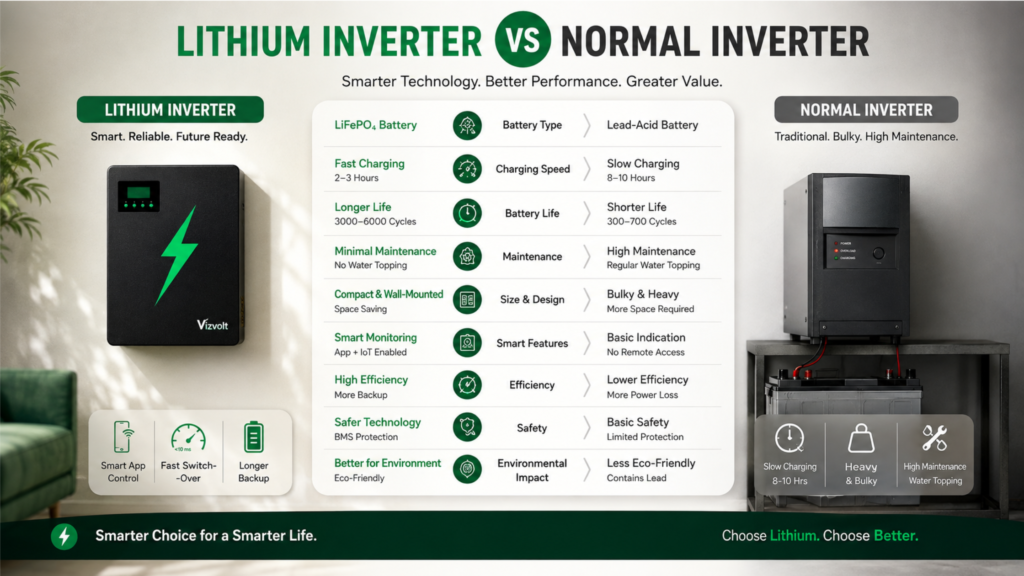
One of the most common questions homeowners ask before purchasing a power backup system is: “What is the 100Ah Battery Backup Time?” The answer isn’t as simple as saying “4 hours” or “6 hours.” The actual 100Ah Battery Backup Time depends on several technical factors, including battery voltage, inverter efficiency, connected electrical load, battery chemistry, depth of discharge, and environmental conditions. Understanding these variables helps you choose the right battery, avoid unexpected power loss, and maximize the performance of your inverter system. In this guide, we’ll explain the 100Ah Battery Backup Time using practical calculations, real-world examples, and engineering principles so you can accurately estimate how long your battery will last. What Does 100Ah Mean? Before calculating 100Ah Battery Backup Time, it’s important to understand what 100Ah (Ampere-hour) actually represents. Battery capacity is measured in Ampere-hours (Ah). A 100Ah battery can theoretically deliver: However, real-world performance is influenced by inverter efficiency, battery condition, discharge rate, and load characteristics. This is why the actual 100Ah Battery Backup Time is usually lower than the theoretical value. Battery Capacity Explained Battery energy is measured in Watt-hours (Wh). The formula is:b Battery Energy = Voltage × Ampere-hour For example: 12V 100Ah Battery Battery Capacity = 12 × 100= 1200 Wh This means the battery stores approximately 1200 Watt-hours of energy. If your appliances consume 600 Watts, the theoretical backup time is approximately: 1200 ÷ 600= 2 Hours However, no inverter operates at 100% efficiency. Actual backup time depends on system losses. How to Calculate 100Ah Battery Backup Time The most commonly used engineering formula is: Backup Time Formula Backup Time = Battery Voltage × Battery Capacity × Inverter Efficiency ÷ Connected Load For a lithium inverter operating at approximately 95% efficiency: Example: Battery= 12V Capacity=100Ah Efficiency=95% Load=400W Calculation12 × 100 × 0.95 =1140 Wh usable energy Backup 1140 ÷ 400= 2.85 Hours Approximate Backup 2 Hours 50 Minutes This calculation provides a much more realistic estimate of 100Ah Battery Backup Time than simply dividing battery capacity by load. Real-Life 100Ah Battery Backup Time Examples Below are practical examples based on a 12V 100Ah battery with an inverter efficiency of 95%. Connected Load Approximate Backup Time 100 W 11.4 Hours 200 W 5.7 Hours 300 W 3.8 Hours 400 W 2.8 Hours 500 W 2.2 Hours 600 W 1.9 Hours 700 W 1.6 Hours 800 W 1.4 Hours These values are approximate and may vary depending on battery health, ambient temperature, and inverter performance. Example Load Calculation Suppose your home is running: Total Connected Load 40 + 210 + 15 +120 +75 = 460 Watts Now calculate the 100Ah Battery Backup Time. Battery Energy12 ×100 ×95%=1140Wh1140 ÷460= 2.47 Hours Approximate backup: 2 Hours 30 Minutes This example demonstrates how appliance selection directly affects the 100Ah Battery Backup Time. Factors Affecting 100Ah Battery Backup Time Many people assume battery capacity alone determines backup duration. In reality, several technical factors influence the 100Ah Battery Backup Time. 1. Connected Load The higher the total wattage, the faster the battery discharges. Reducing unnecessary appliances significantly increases backup time. 2. Inverter Efficiency Modern lithium inverters typically achieve efficiencies between 93% and 97%. Older systems may operate below 85%, reducing usable battery capacity. A more efficient inverter improves 100Ah Battery Backup Time without changing the battery itself. 3. Battery Chemistry Different battery technologies provide different usable capacities. Lithium Battery Lead-Acid Battery Battery chemistry has a significant impact on actual 100Ah Battery Backup Time. 4. Depth of Discharge (DoD) Depth of Discharge determines how much of the stored energy can safely be used. Typical values: Lead-Acid≈50% Lithium≈90–95% A lithium battery therefore provides considerably more usable energy from the same 100Ah capacity. 5. Ambient Temperature Battery performance changes with temperature. Cold environments reduce battery efficiency, while excessive heat accelerates battery aging. Maintaining batteries within the recommended operating temperature improves 100Ah Battery Backup Time and extends service life. Why Lithium Batteries Deliver Better Backup Modern lithium batteries outperform traditional lead-acid batteries in several key areas. Advantages include: These advantages enable homeowners to maximize their 100Ah Battery Backup Time while reducing long-term maintenance costs100Ah Battery Backup Time: Lithium vs Lead-Acid Battery Comparison When calculating 100Ah Battery Backup Time, many users assume that all 100Ah batteries deliver the same performance. In reality, battery chemistry significantly impacts usable backup time, charging efficiency, maintenance requirements, and lifespan. Specification Lithium Battery Lead-Acid Battery Rated Capacity 100Ah 100Ah Usable Capacity 90–95% 45–60% Charging Efficiency 95–98% 75–85% Typical Cycle Life 3000–6000 Cycles 500–1000 Cycles Charging Time Faster Slower Maintenance Maintenance-Free Regular Water Topping Weight Lightweight Heavy Voltage Stability Excellent Moderate Although both batteries are rated at 100Ah, a lithium battery provides more usable energy because of its higher Depth of Discharge (DoD) and charging efficiency. This results in a longer and more reliable 100Ah Battery Backup Time. 100Ah Battery Backup Time for Common Household Appliances Understanding appliance power consumption makes it easier to estimate backup duration. Appliance Power Consumption Approximate Backup Time LED Bulb 10 W 100+ Hours* Wi-Fi Router 15 W 70–75 Hours Ceiling Fan 70 W 15–16 Hours LED Television 120 W 9–10 Hours Laptop 65 W 17 Hours Desktop Computer 300 W 3.8 Hours Refrigerator 200 W 5.5 Hours CCTV System 40 W 28 Hours *Approximate values based on a healthy lithium battery with a quality inverter. Actual results vary depending on inverter efficiency and battery condition. How to Increase 100Ah Battery Backup Time Many homeowners focus only on buying a larger battery, but simple improvements can significantly increase 100Ah Battery Backup Time. 1. Reduce Connected Load Turn off unnecessary appliances during power outages. Every watt saved extends battery runtime. 2. Choose a High-Efficiency Inverter Modern lithium inverters operate at 93–97% efficiency, reducing energy losses. 3. Use LED Lighting Replacing conventional bulbs with LEDs dramatically lowers total power consumption. 4. Maintain Healthy Charging Practices Avoid leaving batteries deeply discharged for long periods. Regular charging helps maintain battery capacity. 5. Select Lithium Technology Lithium batteries provide higher usable capacity, faster charging, and more consistent voltage, resulting in better

Solar Inverter vs Battery Inverter
Blog

Solar Inverter vs Battery Inverter: Which One is Better for Your Home?

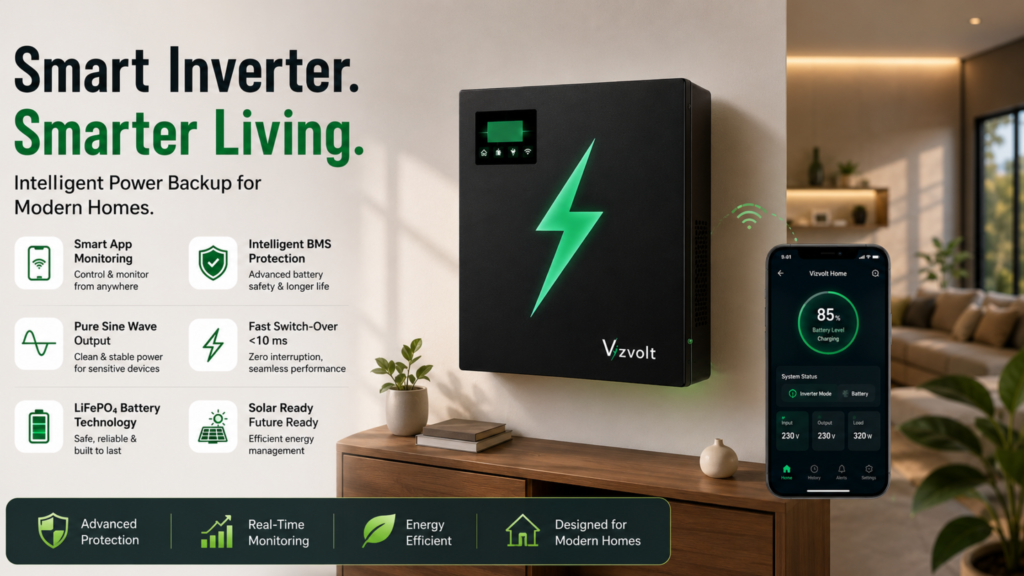
If you’re planning to upgrade your home’s power backup system, you’ve probably come across the debate of Solar Inverter vs Battery Inverter. While both systems provide electricity during outages, they work differently and are designed for different needs. Understanding Solar Inverter vs Battery Inverter is essential before making a purchase. The right choice depends on your energy consumption, budget, access to sunlight, and long-term savings goals. In this guide, we’ll explain Solar Inverter vs Battery Inverter, compare their features, advantages, disadvantages, costs, and help you decide which option is best for your home. What is a Solar Inverter? A solar inverter converts the DC (Direct Current) electricity generated by solar panels into AC (Alternating Current), which powers household appliances. In many systems, solar inverters also manage solar energy production, monitor performance, and, when paired with batteries, store excess electricity for later use. Solar inverters are ideal for homeowners who want to reduce electricity bills and utilize renewable energy. In Simple:A solar inverter is an electronic power conversion device that converts Direct Current (DC) generated by solar photovoltaic (PV) panels into Alternating Current (AC) required by household appliances. Besides power conversion, modern solar inverters also perform: Without a solar inverter, electricity generated by solar panels cannot be used by standard AC appliances. What is a Battery Inverter? A battery inverter is designed to provide backup power during electricity outages. It stores electricity in a battery and automatically supplies power to connected appliances whenever the grid fails. Unlike solar inverters, battery inverters do not generate electricity. Instead, they rely on stored energy charged from the electrical grid or another energy source. The Vizvolt Smart Lithium Inverter is an example of a modern battery inverter designed for efficient home backup. In Simple:A battery inverter converts the DC energy stored inside a battery into AC electricity whenever the grid supply fails. Unlike a solar inverter, it does not generate electricity. Instead, it manages battery charging, energy storage, and instant power delivery during outages. A modern lithium battery inverter like the Vizvolt Smart Lithium Inverter also includes: Solar Inverter vs Battery Inverter: Working Principle Solar Inverter Battery Inverter Solar Inverter vs Battery Inverter: Key Differences Feature Solar Inverter Battery Inverter Primary Function Converts solar energy Provides backup power Energy Source Solar Panels Battery Storage Works Without Sunlight Only with battery storage Yes Reduces Electricity Bills Yes No Backup During Power Cuts With battery Yes Installation Cost Higher Lower Maintenance Moderate Low (Lithium) Best For Energy savings Reliable backup How Does a Solar Inverter Work? A solar inverter follows these steps: This setup is excellent for maximizing renewable energy. How Does a Battery Inverter Work? A battery inverter works differently: Modern lithium battery inverters offer faster switching, better efficiency, and longer battery life. Solar Inverter vs Battery Inverter: Which One Saves More Money? When comparing Solar Inverter vs Battery Inverter, the answer depends on your priorities. Solar Inverter Pros:Lower electricity billsRenewable energyLong-term savingsReduced carbon footprint Cons:Higher upfront investmentRequires sufficient sunlightAdditional battery cost for backup Battery Inverter Pros:Affordable installationInstant backup during outagesWorks day and nightEasy maintenance with lithium batteries Cons:Does not reduce electricity billsBattery replacement after several years Solar Inverter vs Battery Inverter: Which One is Better for Indian Homes? Indian households often face two major concerns: If your primary concern is uninterrupted power during outages, a battery inverter is usually the better choice. If your goal is reducing monthly electricity expenses while generating clean energy, a solar inverter is the ideal solution. Many homeowners today choose a hybrid approach—combining solar panels with a battery inverter for both savings and reliable backup. Solar Inverter vs Battery Inverter: Which System Performs Better During Power Cuts? This is one of the biggest differences in Solar Inverter vs Battery Inverter. A standard grid-tied solar inverter automatically shuts down during a power outage to prevent electricity from flowing back into utility lines—a safety feature known as anti-islanding protection. A battery inverter, however, is specifically designed to continue supplying power during outages by drawing energy from the connected battery. Advantages of Lithium Battery Inverters Modern lithium battery inverters offer several advantages over traditional lead-acid systems: These features make lithium battery inverters ideal for modern homes. Why Choose the Vizvolt Smart Lithium Inverter? If you’re looking for dependable backup power, the VizVolt Smart Lithium Inverter combines advanced lithium technology with intelligent power management. Key Features VizVolt is designed for homeowners who want a modern, hassle-free backup solution that blends seamlessly into contemporary living spaces. Solar Inverter vs Battery Inverter: Which Should You Choose? Choose a Solar Inverter if you: Choose a Battery Inverter if you: For many households, combining solar generation with a smart battery inverter provides the best of both worlds. Frequently Asked Questions What is the difference between Solar Inverter vs Battery Inverter? A solar inverter converts electricity generated by solar panels, while a battery inverter stores electricity and supplies backup power during outages. Which is better: Solar Inverter vs Battery Inverter? It depends on your needs. Solar inverters are ideal for reducing electricity bills, whereas battery inverters are better for uninterrupted backup power. Can a solar inverter work without a battery? Yes. Grid-tied solar inverters can operate without batteries, but they typically stop working during a power outage for safety reasons unless paired with a battery backup system. Does a battery inverter reduce electricity bills? No. A battery inverter provides backup power but does not generate electricity. To reduce electricity bills, you’ll need a solar power system. Can I use a battery inverter with solar panels? Yes. Many modern systems combine solar panels with battery storage to maximize energy savings and provide backup during outages. Is a lithium battery inverter better than a lead-acid inverter? Yes. Lithium battery inverters generally offer faster charging, longer lifespan, lower maintenance, better efficiency, and a more compact design. Which inverter is best for frequent power cuts? A battery inverter, especially one with lithium technology, is the preferred choice for homes that experience regular power outages. Is Vizvolt suitable for modern homes? Yes. The

Shopping Cart
Scroll to Top